Apache load balancing and failover with pound
What is server load balancing?
Load balancing is a way to split all the income requests, to more than 2 servers. You must have a load balancing when you have a lot of income requests that a server can not handle. If you have for example a web site with a lot of visitors that a single server will not be able to handle, you must split the traffic to 2 or more web servers. In this tutorial i will use 2 web servers and a load balancing server to redirect the http request.
What is server failover?
If you have a web site in a web server and you want for example to close this server for maintenance reasons or if your server due to a technical reason stop operating, your website will be offline until you fix this problem! Fail over is a way to automatically redirect the incoming requests for your website to another web server.
In this tutorial you will find an easy way to load balancing and failover using pound. Pound is an open source reverse proxy that can handle load balancing and failover with a strong emphasis in security.
Lets say that you have a static ip (i will use a non-existing IP 145.47.82.256), a domain name (allaboutlinux.eu) for your website, a webserver (with internal IP 192.168.0.250) and a router (configured to redirect all the incoming requests for port 80 to 192.168.0.250). If you have all the above its easy to create a public website hosted on your webserver. But this server has no failover or load balancing since its a single server.
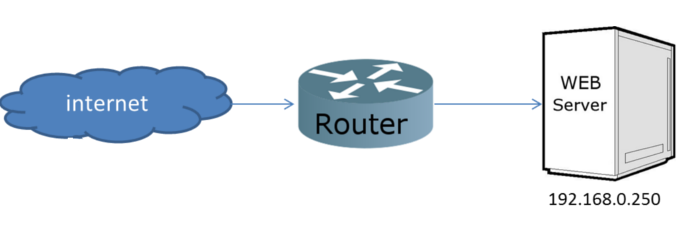
If you need failover and load balancing you will need one more server with a replica of your website and a server that will handle the load balancing and fail over. Lets start creating the Pound server!

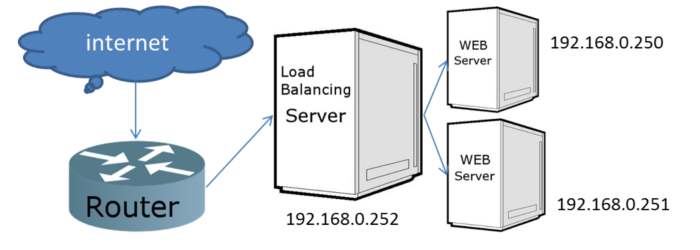
The second web server in this example will take the internal ip 192.168.0.251 and you must create it with a replica of your website.
The Pound server in this example will take the internal ip 192.168.0.252. Now you have to configure your router to redirect all the requests for port 80 to Pound server (in this example to 192.168.0.252).
Note Pound server has no webservice installed. This server will just redirect the requests to the web servers!!! Ok so now you have a network topology like the following.
Lets install pound to our load balancing server. To do so open a terminal and type:
sudo apt-get update
sudo apt-get install pound
Now you have installed Pound in the loadbalancing server but you have to configure it in order to activate it. Open a terminal and type:
sudo gedit /etc/pound/pound.cfg
or in Ubuntu server edition
sudo nano /etc/pound/pound.cfg
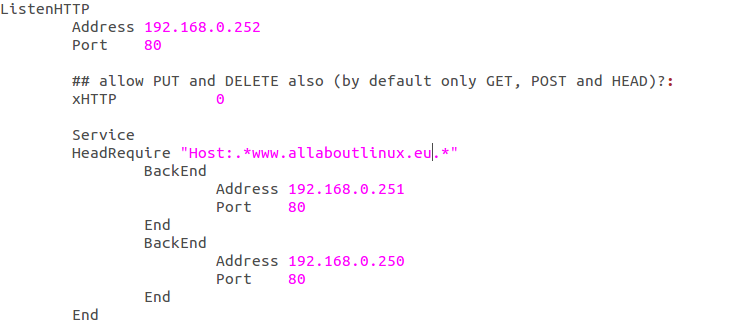
Now go down to “ListenHTTP” and in Address use the Pound ip in this eaxample 192.168.0.252 and use the port 80
Now after the word “Service” add a new line and write “HeadRequire “Host:.*www.allaboutlinux.eu.*”” where allaboutlinux.eu is your domain name.
At the backend address write the internal ip of your 1st web server in this example 192.168.0.250 and set port to 80.
Now create a new backend for your second webserver with address 192.168.0.251 and port 80.
Your file now should look like the following picture
Now we are almost ready! Save and close the cfg file open a terminal and type:
sudo gedit /etc/default/pound
and change the startup=0 to startup=1. After that save and close. Now type
sudo /etc/init.d/pound start
this command will start the load balancing server